
Documentation Index
Fetch the complete documentation index at: https://docs.heroncopier.com/llms.txt
Use this file to discover all available pages before exploring further.
2026-05-06
The dashboard has been redesigned to make it cleaner, faster, and easier to customize around the things you actually care about.What’s new:
- Dashboard now supports extra widgets whenever you need them
- You can remove widgets you don’t use, except for the accounts list (it has to be there by default, else you won’t be able to see your accounts)
- The dashboard has been redesigned to make it cleaner, faster, and easier to customize around the things you actually care about.
2026-04-26
Slave copier apps now support optional copied lot-size caps for better account-level risk control.
- Set global minimum and maximum copied lot sizes on slave accounts to keep calculated trade sizes within your preferred limits.
- Add symbol-specific minimum and maximum caps when a particular market needs different sizing rules than the rest of the account.
- For the cloud version: Dashboard create/edit flows now support these settings, including a Builder UI for symbol-specific caps.
2026-04-06
Bitcoin payments are now live on Heron Copier via BTCPay Server.
- New monthly and yearly subscriptions can now be paid with Bitcoin.
- If your subscription starts with Bitcoin, future seat upgrades and renewals can also be managed from the dashboard and paid with Bitcoin.
- Bitcoin payment is currently available for new subscriptions only.
- Existing subscriptions cannot be switched to Bitcoin yet.
- Bitcoin renewals are not automatic, so you will need to self-manage your renewal from the dashboard to keep your subscription active.
2026-03-31
DXtrade slave copier app for the local version:
- Fixed the issue with trade not being able to be closed on some brokers
2026-03-15
TradeLocker slave copier app 20260315:
- Fix the fixed risk options.
- Implemented fallback connection to use REST API in case the Streams API of TradeLocker failed to return sync confirmation on their end. If your instance is stuck in synchronization phase, you should update to this version.
- Added min/max lot size cap. If the calculated lot size is outside of the max/min lot size defined by the broker, the lot size will be capped.
2026-03-08
cTrader slave copier app 20260308:
- Fixed an issue where some prop firms or brokers could close copied positions before the copied TP/SL were applied.
- If the master trade includes either TP or SL, the slave now opens with temporary 500 pips TP/SL protection first, then immediately updates both values to the copied master levels.
2026-02-15
General improvements for local-version copier apps:
- MT4, MT5, and cTrader: updated the UI for the local versions.
- MT4 and MT5: reduced verbosity in Experts logs.
- MatchTrader: removed unused API calls in non-API local mode.
- TradeLocker: added more connection fallbacks so the copier can use the REST API when the TradeLocker Streams API returns delayed data.
- Delay feature: improved use-case support for dynamic delay values.
- These are only examples. You can set any values based on your preference.
3000: uses a dynamic delay between0msand3000ms.2000-3000: uses a random delay within a fixed range of2000msto3000ms.3000-3000: uses a fixed delay of exactly3000ms(3s).
2026-02-08
MatchTrader slave copier app:
- Removed instruments list and fixed position syncing.
2026-02-03
Hey everyone! 👋Big one today - Telegram Signal Copier is here (Beta) 🚀You can now copy trades directly from Telegram signal channels to your slave accounts. No more manually reading signals and placing trades - just connect your Telegram channels and let Heron Copier do the rest.How it works:
- Add a Telegram Master account from your Cloud Dashboard
- Enter your Telegram API credentials
- Enter the channel ID you wish to copy
- The copier uses AI to parse trade signals from any channel format - no templates or specific formatting required
- ✅ Market orders (BUY/SELL) with TP and SL
- ✅ Close and close-all signals
- ✅ Quoted reply to modify TP/SL or close specific positions
- ✅ Works with any signal format - the AI figures it out
- ❌ Pending / limit / stop orders (ignored for now)
2026-02-01
MatchTrader slave copier app:
- Fixed an issue where Fixed Risk (by Percentage and by Nominal) modes calculated incorrect lot sizes on certain brokers. The problem was caused by inconsistent instrument data returned by different MatchTrader broker APIs — some brokers store the contract size value in a different field than others. For example, on XAUUSD (1 lot = 100 oz), one broker returns
multiplier: 100, contractSize: 1while another returnsmultiplier: 1, contractSize: 100. The copier now correctly reads both fields to ensure accurate lot sizing regardless of how the broker structures their instrument data.
2026-01-28
MatchTrader and DXtrade slave copier apps (Non-API mode):
- The copier now checks if your computer has enough memory before starting Non-API mode. If not, you’ll see a clear error message instead of a crash
- The browser window is now visible by default in Non-API mode so you can see what’s happening
- The browser window is now smaller and takes up less screen space
- Fixed an issue where saving and loading profiles did not remember the API/Non-API mode setting (DXtrade)
2026-01-18
Hey everyone! 👋We’ve been busy shipping some quality-of-life improvements to make your trading experience smoother and more secure. Here’s what’s new:🔒 Two-Factor Authentication (2FA)Your account security just got an upgrade. You can now enable 2FA to add an extra layer of protection to your dashboard login.How to enable it:
→ Click “E-mail Notifications” under Settings
→ Toggle on “Failed Trade Copy Notifications”Disabled by default, so you will have to opt-in. 🙌🔔 Browser NotificationsReal-time toast notifications weren’t enough, so we added browser notifications too.Now when a trade copies (or fails), you’ll get a browser notification even if the dashboard tab is in the background. Perfect for keeping an eye on things while you’re doing other stuff.To enable it:
As always, if you run into any issues or have feedback, let us know! We’re always looking for ways to make Heron Copier better for you. 🚀
- Go to your Dashboard
- Look for “Settings” in the sidebar
- Click on “Two-Factor Auth”
- Scan the QR code with your authenticator app (Google Authenticator, Authy, etc.)
- Which account and platform failed
- The symbol and side (BUY/SELL)
- The actual error reason from the logs
- AI-powered recommendations on how to fix it 🤖
→ Click “E-mail Notifications” under Settings
→ Toggle on “Failed Trade Copy Notifications”Disabled by default, so you will have to opt-in. 🙌🔔 Browser NotificationsReal-time toast notifications weren’t enough, so we added browser notifications too.Now when a trade copies (or fails), you’ll get a browser notification even if the dashboard tab is in the background. Perfect for keeping an eye on things while you’re doing other stuff.To enable it:
- Open your Dashboard
- Your browser will ask for notification permission
- Click “Allow”
As always, if you run into any issues or have feedback, let us know! We’re always looking for ways to make Heron Copier better for you. 🚀
2026-01-16
TradeLocker master and slave copier apps:
- Improved connection stability
- Fixed labels visibility on the chart
2026-01-10
Hey everyone! 👋We just shipped something new that we’ve been working on: AI Mentoring is now live in the Trading Journal (currently in BETA).Think of it as your personal trading coach that actually knows your trading history. It looks at your trades, journal entries, emotions, and ratings to give you feedback that’s specific to you.This AI focuses on trading psychology and discipline, not market analysis or signals. It won’t tell you when to buy or sell. Instead, it helps you understand your own patterns and become a more consistent trader. 🚀What it can help with: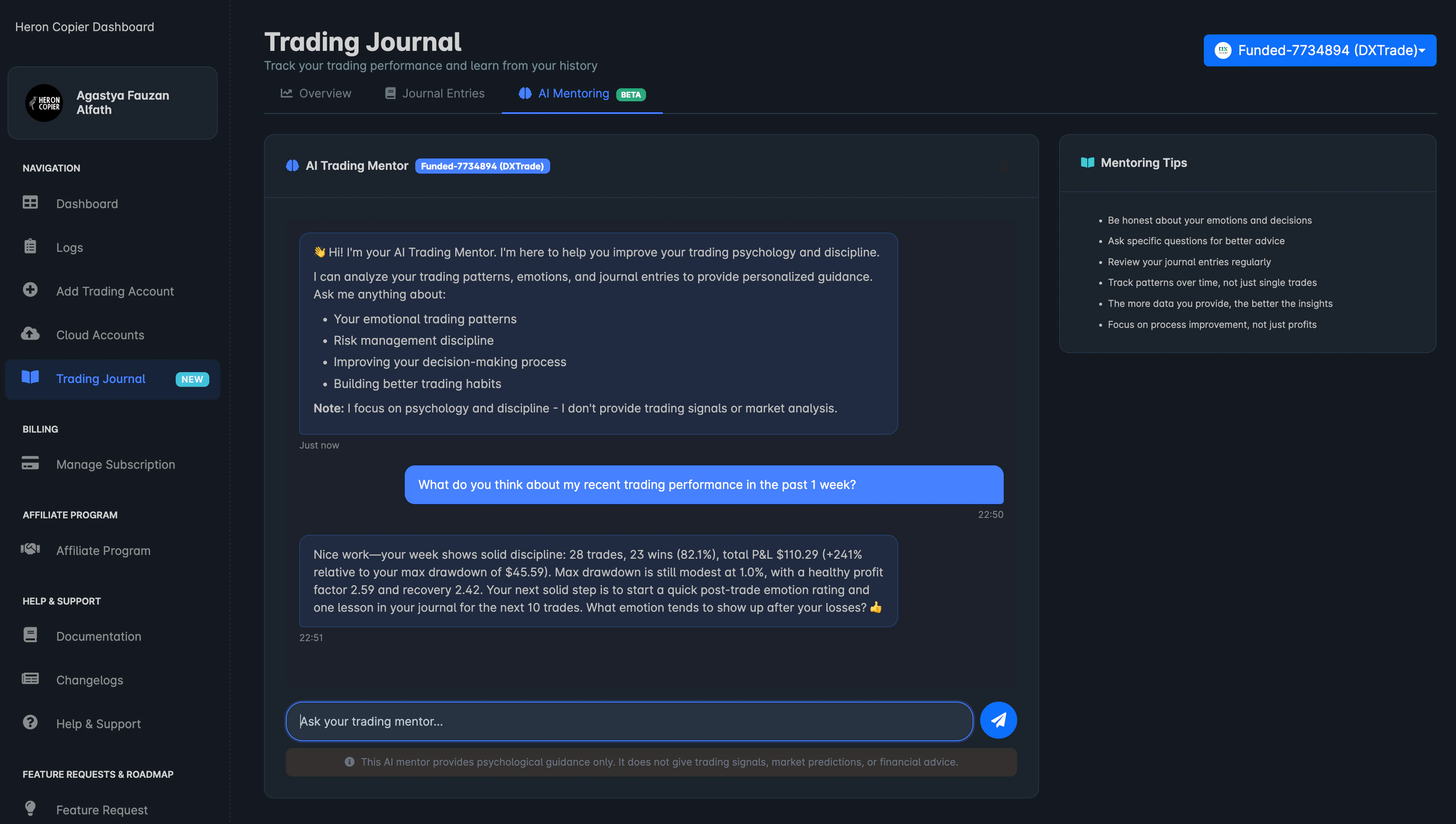
- Spotting emotional patterns that might be affecting your decisions
- Reviewing your recent performance (shows both dollar amounts and percentages)
- Giving practical advice on discipline and mindset
- Building better trading habits over time
- Head to your Trading Journal
- Pick a specific account from the dropdown
- Open the AI Mentoring tab
- Ask it anything about your trading 💬
2026-01-09
MatchTrader slave copier app:
- Enabled FundingPips API access for MatchTrader accounts since they seem to have allowed it.
- Added WebSocket support for real-time updates. If you are using the local version of the copier, you will need to update to this latest version.
2025-12-31
Just some little updates for MT4/5 master and slave EAs for the local version:
We fixed the reconnection handler not to close the terminals when the broker connection is lost.While such behavior is desired for cloud accounts, it’s not for local accounts.Download the latest version from heroncopier.com/download, and don’t forget to run the EA installer from the Connector app.
2025-12-27
Hey everyone! 👋We’re excited to announce that we just pushed an update for the local version!📊 Trading Journal Now Available on Local VersionThe Trading Journal feature that was previously only available on the cloud version is now fully supported on the local version as well! 🎉This makes Heron Copier the only local copier that supports a trading journal feature. Trade on your own premise while benefiting from features typically offered only by cloud-based copiers! 🏆All the same great features are now at your fingertips:
- 📈 Equity & Balance Tracking - Automatic snapshots with beautiful interactive charts
- 📋 Trade History - All your closed trades automatically synced
- 📝 Journal Entries - Add notes, emotions, ratings, and detailed analysis to your trades
- 📊 Meaningful Metrics - Discover hidden patterns in your trading with statistics you’d never uncover on your own — win rates by session, average hold times, drawdown analysis, and more
2025-12-14
Hey everyone! 👋We’re thrilled to announce a brand new feature that will take your trading to the next level!📊 Introducing: Trading Journal💭 Why We Built ThisAs traders ourselves, we’ve learned that understanding your emotions plays a bigger role than any strategy out there. You can have the best system in the world, but if you can’t manage your psychology, you’ll struggle to stay consistent.That’s why we focused on making it easy for you to track your emotions, thoughts, and most importantly, the lessons you can learn from your trades.A journal should be a place where you can reflect on your trading journey and learn from your mistakes. It should be a place where you can celebrate your wins and grow from your losses.When it comes to trading, we can’t predict or control where the market is going — but we can control our emotions and how we react to it.✨ Key Features:📈 Equity & Balance Tracking
- Automatic snapshots of your account equity and balance
- Beautiful interactive charts showing your growth over time
- Filter by account, date range, and more
- All your closed trades automatically synced to your journal
- Filter by symbol, account, outcome (win/loss/breakeven)
- View detailed trade information including entry, exit, volume, and P&L
- Add notes, emotions, and ratings to any trade
- Tag your trades for easy categorization
- Write detailed analysis using our Markdown editor
- Track your psychological state and learn from your patterns
- Generate beautiful shareable images for any trade
- Includes QR code linking to your public trade page
- Perfect for sharing your wins on social media!
- Go to your dashboard at https://dashboard.heroncopier.com/
- Navigate to the Cloud Accounts page
- Click the “Redeploy Instance” button on each of your accounts
- Wait for the instance to restart (this will take 2-3 minutes at max)
- That’s it! Your trades will start syncing automatically
2025-12-11
Hey everyone! 👋We’re excited to announce two new volume sizing options that many of you have been asking for!🙏 We know this has been a long time coming!We’ve been promising this feature for a while now, and we apologize for the delay. Behind the scenes, we’ve been working on a lot of quality-of-life improvements, bug fixes, and infrastructure upgrades to make the copier more stable and reliable. But we’re thrilled to finally deliver this highly requested feature!🎯 New Volume Sizing Options: Fixed Risk by Percentage & Fixed Risk by NominalWe’ve added two powerful new ways to manage your position sizing:Fixed Risk by Percentage
- Set a fixed percentage of your account equity to risk per trade
- Example: If you set 1% and have 100
- Perfect for consistent risk management across all trades
- Set a fixed monetary amount (in your account currency) to risk per trade
- Example: If you set 50
- Great for traders who prefer fixed dollar-amount risk
- MT4 & MT5 (both local and cloud)
- cTrader (both local and cloud)
- DXTrade (both local and cloud)
- MatchTrader (both local and cloud)
- TradeLocker (both local and cloud)
2025-09-09
Some little updates for local version of the copier:
- MatchTrader slave: Fixed the non-API mode for Maven accounts
- TradeLocker slave: Improved closing operation speed
2025-09-07
Hey everyone! 👋Hope you’re all crushing it with your trades! We’ve got some HUGE news that’s going to make your cTrader experience so much better.🚀 Major cTrader Cloud Upgrade - 100% Feature Parity!We’ve completely rebuilt our cTrader cloud implementation from the ground up! Instead of using the old token-based OpenAPI approach, we’ve switched to using cTrader Algo (the same engine that powers our local desktop version).What this means for you:
- 100% feature parity - Your cTrader cloud accounts now have ALL the same features as the local version
- Better stability - No more random disconnections that plagued the old OpenAPI implementation
- Same level of performance - Consistent execution and more reliable connections
- Simplified setup - Just enter your email, password, and account number - no more OAuth token hassles!
- Before: Token-based authentication with limited OpenAPI features
- Now: Direct credential login using the full cTrader Algo engine
- Result: Same reliable experience whether you’re using cloud or local!
- Delete your current cTrader cloud accounts from your dashboard
- Create new ones using your direct cTrader credentials (email/password/account number)
- Enjoy the much more stable experience!
- Improved MatchTrader slave - Now properly handles volume step requirements and rounding for specific symbols
- Enhanced MT5 master - Better handling of edge cases where withdrawals trigger position closures without symbols or position IDs attached
2025-08-22
Hey everyone! 👋Hope you’re all doing well and making some good trades! We’ve got some exciting news to share with you.🎉 You can now buy additional cloud seats right from your dashboard!
We’ve been working hard to make this as smooth as possible for you. No more waiting for us to manually add seats - you’re now in full control!💌 Special offer for our amazing community
Since many of you have been asking about this feature, we wanted to give you something special. If you decide to grab some extra seats before August 31st, you’ll get 20% off FOREVER - seriously, as long as you keep your subscription, that discount stays with you.Just use the code CLOUD and you’ll pay 8/month per seat.🤗 No pressure though!
Here’s the thing - we’re not enforcing seat limits until September 1st anyway. This is really just us giving you the chance to lock in some great pricing while helping us cover our growing server costs (our 750+ vCPU cores and 1.4TB RAM cloud infrasructures aren’t cheap! 😅).For our beta family: You’re still getting your 4 accounts with the base plan (yes, 4 accounts since you’re all grandfathered in, not 3 accounts).
For newer folks: You get 2 accounts with your base plan, and can purchase more seats whenever you need them.🚀 How it works:
Just head to your Cloud Accounts page, look for the “Seat Management” section, and you’ll see options to add more seats. The whole process takes like 30 seconds - we made it super simple.📅 Timeline:
Right now through Aug 31: Get that 20% discount with code CLOUD
Sept 1: We’ll start actually enforcing the limits, and start shutting down instances from unpaid users starting on the 7th of September (server costs are expensive, we can’t keep offering the extra seats for free forever)As always, if you run into any issues or have questions, just drop a message here and we’ll sort you out. We really appreciate all your support - it’s what keeps this whole thing running! 🙏Happy trading! 📈P.S. - The 20% discount offer expires August 31stP.P.S - We’re still working on “Fixed Risk by %” volume sizing option, stay tune for more updates from us in the next few days!
2025-08-09
Minor Updates - Cloud Dashboard⏯️ Pause/Resume Controls
Added pause/resume buttons to cloud accounts page. Now it’s even easier to pause/resume selected account(s).🤖 AI-Powered Trade Copier Logs Analysis
We know it’s frustrating when you don’t know the meaning behind the logs returned by the API servers of different platforms - they can be so technical. To make it easy, just click the “Analyze” button where our ChatGPT-powered AI assistant will help you understand the reason why some trades didn’t get copied (e.g. symbol mismatches, invalid volume, insufficient margin, trade account disabled, etc.). The AI assistant will even provide a working solution so you can proceed to change your copier settings to fix the problem.Both features are live now. As always, let us know if you run into any issues 💪
2025-08-07
Hey everyone! 👋Just pushed some updates that you’ve been asking for - finally got Equity to Equity and Risk Multiplier working across MatchTrader, DXTrade, and TradeLocker! Plus some game-changer features… 🚀🆕 What’s new:
- Equity to Equity for DXtrade, MatchTrader, and TradeLocker slaves - Your trades now scale based on account balance differences (no more manual math!)
- Risk Multiplier - Same as above but with your own custom multiplier for extra control (e.g. in case you want to risk 1% on the master account, but 0.5% on the slave account)
- Auto Symbol Mapping - This thing is actually smart now! Handles USD/JPY vs USDJPY (and other symbols too, of course), strips broker suffixes (.pro, .raw, etc.), and just figures out what symbol that are available
- Account Switching - You can now edit existing slave accounts to listen to different master accounts! No more deleting and re-adding everything!
- Server Browser - Browse and select servers easily, or type in new ones if they’re not listed yet
2025-07-27
Cloud Version:🎉 Beta Update - Last week was absolutely mental! 🎉Guys, seriously… I know we’ve been in beta for 3 weeks now, but last week was something else entirely!Ever since TC dropped MT platform support, you all came flooding in and honestly, it’s been so much fun watching everyone jump on board. The energy shift in here has been incredible.We went a bit crazy with the servers…
- Had to scramble and triple our capacity in just one week 😅
- Now sitting at 550+ vCPUs and 1.1 terrabytes of RAM
- Still adding more until we wrap up in September (RIP our servers bill)
- Never thought we’d need this much this fast, but here we are!
- Keeping everything snappy
- Getting all the platforms to play nice together and working on feature parity between them
- Adding more QoLs updates (the server browser is FINALLY there now)
- Those confusing logs - yeah we are aware that they suck right now, working on making them actually useful (the logs should speak human language like “not enough margin” or “market closed” instead of throwing some errors codes)
- The non-API mode for MatchTrader slave copier app has been updated to exclude the balance/equity update functionalities (build number 20250727). That functionality is intrusive due to the way it works without being able to read the balance/equity from the API. Removal of this functionality will make the non-API mode more stable and reliable for the local version.
2025-07-12
cTrader slave cloud copier is now officially available. This means that now the cloud-based copier supports all 6 platforms (cTrader, MT4, MT5, MatchTrader, TradeLocker, DXtrade)There is no need to download and install anything. You can simply add your cloud accounts from the dashboard and you are good to go.
2025-07-05
- Added MatchTrader, TradeLocker, and DXtrade support for the cloud-based copier!
- Added 2 more free slots for beta testers. In total, every paid subscription (monthly or yearly) includes 4 free cloud accounts during the beta period.
- Fixed missing logs on various platforms.
- TradeLocker slave copier app: Improved reliability of closing positions by retrying failed closing operations up to 5 times in case of timeouts.
2025-06-28
Our cloud-based copier is now available for public testing!
We will start with MT4 and MT5 platforms and then expand to other platforms in the coming weeks.To add your cloud accounts, go to the “Cloud Accounts” section on the sidebar menu on the Dashboard page.p.s. As a subscriber, you get access to 2 seats for free during the beta period. But please let us know if you need more seats.
2025-06-21
- Updated Connector app to 2.0.5
- Added support for Maven for MatchTrader non-API mode
- Fixed load profile functionality on TradeLocker copier apps
- Introduced rolling updates for individual copier apps, so you can update the copier apps without having to redownload the entire app.
2025-06-14
Added “Connection Map” feature that shows the topology of the connected accounts.
To use this feature, you will have to update all copier apps.
2025-06-09
MatchTrader slave copier app (API mode):
- Adjusted the copier to be compatible with MatchTrader’s web platform
2025-06-06
DXtrade slave copier app:
- Fixed an issue where trades couldn’t be properly confirmed as opened. This happened because there was a delay between when a position was opened and when the API server provided the position ID. The fix ensures trades are properly tracked even with delayed server responses.
2025-05-31
Fixed a bug in the non-API mode of the MatchTrader slave copier app when multiple different MatchTrader accounts are connected to the same prop firm.
2025-05-18
The Connector app and all the copier apps for all platforms have been updated to v2.0.3 with the following improvements:
- Added Logs section so the user can check the copy logs directly from the app and the dashboard as well.
- Added killswitch button to close all positions and stop the specific copier instances.
- Added Equity/Balance-based “Account Protection Mode” feature for all slave copier apps.
- Removed Telegram notifications feature. This feature is removed because only less than 1% of the users are actually using this feature and maintaining it is not worth the effort.
2025-05-11
MatchTrader and DXtrade slave copier apps:
- Logic improvements to fetch the balance/equity in non-API mode
2025-05-03
DXtrade slave copier app:
- Fixed the non-API mode issue where the copier would get disconnected after 24 hours of operation.
2025-04-14
MatchTrader master copier app:
- Fixed a bug with MatchTrader master copier app that would incorrectly close trades when copying from multiple MatchTrader master accounts simultaneously,
2025-04-13
cTrader slave cBot:
- Fixed the magic number black/whitelist rules
- Fixed the initial login issue when using non-API mode
- Fixed the lot sizing issue for some brokers when using non-API mode
2025-04-05
MatchTrader and DXtrade slave copier apps:
- Introduced non-API mode: This mode allows the copier to copy trades without using the API. This feature is useful for platforms that do not provide a public API or have limited API access (e.g. when the prop firms do not allow API access)
2025-03-12
MT4 and MT5 slave copier EAs:
- Fixed a bug where the copier incorrectly used “Lot Multiplier” instead of “Fixed Lot” when copying trades with symbol aliases enabled.
2025-03-11
cTrader slave cBot:
- Fixed a regression bug affecting the “Lot Multiplier” volume sizing option
2025-03-08
- All copier apps for all platforms have been updated to support displaying open and closing time in “open positions” and “history” actions from the dashboard
- DXtrade/MatchTrader/TradeLocker copier apps: added an additional retry logic for failed closing in case the position is closed within less than 1 seconds in the master account
2025-03-05
MT4 and MT5 slave copier EAs:
- Fixed an issue where trades could not be closed in certain scenarios when using magic number whitelist filtering.
2025-03-02
DXtrade master copier app:
Improved performance.
2025-02-23
Connector app updates:
- Now you can launch trading terminals with preconfigured copier settings straight from the Connector app.
- More streamlined installation process.
- Improved UI/UX
- Added support for magic number blacklist and whitelist.
2025-02-15
- MT4 slave copier app: Added a fix to handle symbol-specific fixed lot sizes.
- MT5 slave copier app: Added a fix to proportionally close trades that were opened with fixed lot sizes.
2025-02-01
MatchTrader slave copier app:
- Performance improvement
2025-01-25
- DXtrade/TradeLocker/MatchTrader slave copier apps:
- Resolved an issue with the pause button, which previously led to the application reverting to old configurations when clicked multiple times before a full connection to the API server was established.
- Added missing fields in email notifications for certain trading platforms
- MT4 master copier EA:
- Improved performance
2025-01-18
- TradeLocker slave copier app: Implemented additional checks to validate copied trades that may be rejected by the server during rollover time.
- MT4 and MT5 slave copier apps: Fixed a cosmetic bug where the copier app would not display correct volume sizing option on the chart.
- Added email notification feature for all slave copier apps. This feature will send an email to the user whenever a trade is copied or closed to the slave account. The email will include details such as the trade direction, symbol, volume, and timestamp. (Please note that some fields may be left blank if the information is not available via the API on certain platforms.)
2024-12-22
- v1.4.94 released for Connector app and the dashboard page.
- All master and slave copier apps have been updated to be able to receive instructions sent from the dashboard.
- Removal of “Use Connector App” option. Now all copier EAs/apps directly connect to the dashboard.
- Now you can query open positions, order history, fetch copier’s configurations, and even close all positions straight from the dashboard page.
2024-12-03
DXtrade slave copier app:
- Fixed a bug in the “Fixed Lot Size” volume sizing option.
- Fixed the rounding issue in fractional lot sizing.
2024-11-30
DXtrade, MatchTrader, and TradeLocker slave copier apps:
- Persistent Logging: Logs are now saved as text files and can be accessed via the Help -> Open Logs Folder menu.
- Improved Error Handling (MatchTrader): Enhanced error handling implemented to manage unexpected API responses better.
2024-11-09
TradeLocker master and slave copier apps:
- Added developer-key-api in the request headers as requested by TradeLocker developers.
2024-11-02
DXtrade and MatchTrader slave copier apps:
- Updated UX: Implemented a confirmation dialog box that appears when users attempt to close the app while connected to the server. This feature ensures users are aware that any active positions will be left orphaned if the app is restarted without properly closing those copied positions first.
2024-10-28
cTrader slave cBot:
- Enhanced API Functionality: Introduced the capability to log open and close results to the api/position endpoint. This update improves tracking and reporting but does not alter existing functionalities. Any algos or Expert Advisors (EAs) relying on this endpoint will benefit from this added feature.
2024-10-27
DXtrade and TradeLocker slave copier apps:
- Bug Fix: Resolved an issue within the TradeLocker slave copier app that occasionally prevented the closure of existing positions due to them not being located. The copier will now continuously query the order history endpoint on the TradeLocker API server until the position is successfully identified. While this may slightly reduce the speed of trade execution, it significantly enhances the reliability of closing positions. This update also improves the opening operation.
- Enhanced Logging: Introduced additional logging features to the DXtrade slave copier app,
2024-10-19
DXtrade, TradeLocker, and MatchTrader slave copier apps:
- User Interface Enhancements: We’ve made significant improvements to the UI for a smoother and more intuitive user experience.
- New Features Added:
- Copy TP/SL Options: Users can now select whether to copy Take Profit (TP) and Stop Loss (SL) settings from the master account. For those opting not to copy SLs, we highly recommend operating the copier on a reliable VPS to ensure optimal performance.
- Reverse Trade Functionality: Trades copied from the master account can now be reversed. This feature is particularly beneficial for capitalizing on unprofitable strategies or hedging positions from the master account.
2024-10-11
MatchTrader slave copier apps:
- Improved the handling of bulk-closing operations.
2024-10-06
DXtrade, TradeLocker, and MatchTrader slave copier apps:
- Enhanced auto relog functionality: improved the automatic relogging process to ensure seamless token refreshes, minimizing downtime when token refresh fails.
- Improved logging: enhanced logging capabilities for both successful and failed copy and close operations, providing better visibility and tracking of actions.
- Improved save/load profile feature: symbol suffixes, aliases, and volume sizing options are now saved in the profile.
2024-10-01
DXtrade master copier app:
- Added a fix to prevent the copier from sending unnecessary modification instructions to the slave accounts when there are no changes in the TP/SL.
2024-09-27
DXtrade slave copier app:
- Added a fix to handle further edge cases where the trade doesn’t get sent to the API properly because the lot size variable contains more than 2 decimal places.
2024-09-23
DXtrade master copier app:
- Fixed a bug related to improper lot sizing when copying trades from a DXtrade account to other platforms.
- The lot size copied from DXtrade master account now accurately reflects the symbol specifications retrieved from the DXtrade API (using the /instruments/query endpoint).
2024-09-13
DXtrade slave copier app:
- Added a fix to handle edge cases where the trade doesn’t get sent to the API properly because the lot size variable contains more than 2 decimal places.
2024-09-08
DXtrade slave copier app:
- Added small fix to allow copying of the trade from TradeLocker master account when TP/SL is not set.
2024-08-29
DXtrade slave copier app:
- Added another function to fetch instruments specifications from the API (/instruments/query endpoint). This eliminates the need to adjust the lot sizing for some pairs that may vary between broker to broker (e.g. Metals and Indices pairs).
2024-08-25
TradeLocker master and slave copier app:
- Added function to auto-relog the user in whenever the token failed to be refreshed to solve the problem with expired token after every maintenance window during the weekend
2024-08-23
TradeLocker slave copier app:
- Hotfix to fix 520 HTTP error code returned by the server which seems to happen intermittently for some users.
2024-08-22
DXtrade slave copier app:
- Added logics to handle instruments mapping without slash separator. If you use AscendX, you should update to this version.
- For enabling XAUUSD trading on AscendX receiver account, please use the following settings in “Symbol Alias” field: XAUUSD=XAUUSD|100
2024-08-19
DXtrade slave copier app:
- Hotfix to omit certain symbols from being used with Forex major pairs lot specifications due to server configurations (at least found in FXIFY where gold pairs are mapped as Forex in their assets class specifications)
- Fixed the bug with wrong balance showing up on the dashboard/connector app when the user has multiple accounts in the same broker/prop firm.
- Better handling for failed refresh token.
- Fixed a regression bug with 1st trade that didn’t get opened when the EA first started.
2024-08-15
TradeLocker slave copier app:
- Improved retry logics for failed API calls.
- Improved closing operation by throttling the closing operation to 1 operation per second.
- Above changes are intended to avoid rate-limit imposes by TradeLocker API.
2024-08-13
TradeLocker copier apps:
Improved the detection for server maintenance.
When the copier has detected that the server is in maintenance, it will stop itself.
2024-08-11
Starting from v1.4.93, update notification can be done partially.
This means that if there are updates that are only relevant for certain platforms, the copier for other platforms wouldn’t notify the updates.Versioning will mainly use build number rather than version number.
This will make it easier for the developer too to deliver incremental improvements.For this build number, the following copiers have been updated to have better handling for reconnection:
- MT4
- MT5
- DXtrade
- TradeLocker